News Feed
Jobs Feed
Sections


Recent Jobs

News Archive
feed this:

Project:
Kint - Advanced Output for Debugging
January 25, 2011 @ 08:16:09

One of the more difficult parts of development is debugging. Any tool that can help make your bug finding life simpler can be valuable. Raveren has submitted a new tool he's developed to make outputting your debugging information more useful - Kint.

It's basically a heavily improved var_dump and debug_backtrace version with some advanced behind the scenes action. The features description is in the google code page: http://code.google.com/p/kint/ but the interesting part is that this is the only dump tool, that can display the name of the dumped variable as well as use modifiers on the calling function.

The flow is traced back to its origin class/script and a token parser is used to find where the value was created. You can see a sample of how to use it over on its Google Code page. This also includes screenshots of the output and the configuration values you can set for things like a display path callback and the maximum number of levels to traverse through. You can download the current version here.

0 comments voice your opinion now!
kint debugging output trace


David Soria Parra's Blog:
PHP 5.3.99-dev and DTrace Part I
April 29, 2010 @ 12:17:32

As David Soria Parra mentions in a recent post to his blog, the DTrace functionality has been backported to the PHP 5.3 branch and gives developers a bit more information about what's happening inside their applications.

For those not following the PHP development. We backported the DTraces probes from the abandoned PHP 6.0 branch, back to the new trunk PHP 5.3.99-dev. It is called 5.3.99 because the PHP dev community has not decided yet on a version number (5.4 or 6.0).

He gives the configure line to get it working on Solaris and Mac OSX and a sample line of code to ensure everything's working correctly. The results show the full execution of the example. This functionality can replace this extension from the PECL repository.

0 comments voice your opinion now!
dtrace trace backport osx solaris


Chris Jones' Blog:
Tracing PHP Oracle Applications, part 1
January 20, 2010 @ 12:50:45

Chris Jones (of Oracle) has a new post to his OTN blog with a look at tracing in Oracle+PHP applications via some new methods added to the OCI8 extension.

No matter how it was installed, the PHP OCI8 extension provides a procedural API with familiar calls allowing efficient SQL and PL/SQL execution. The extension also supports some advanced Oracle features such as connection pooling. Recently some new OCI8 functions were checked into the PHP source code.

The new functions - oci_set_module_name, oci_set_action and oci_set_client_info - can be used on any existing (or new) Oracle connection to provide a bit more information about what's going on inside. You can get access to this information via the data dictionary views or through the SYS_CONTEXT() function in your SQL statements.

0 comments voice your opinion now!
trace oracle oci8


Derick Rethans' Blog:
Xdebug and tracing memory usage
November 13, 2009 @ 08:15:09

Derick Rethans has a new post today talking about using the Xdebug tool to track the memory usage in your application with some of its profiling capabilities, specifically function traces.

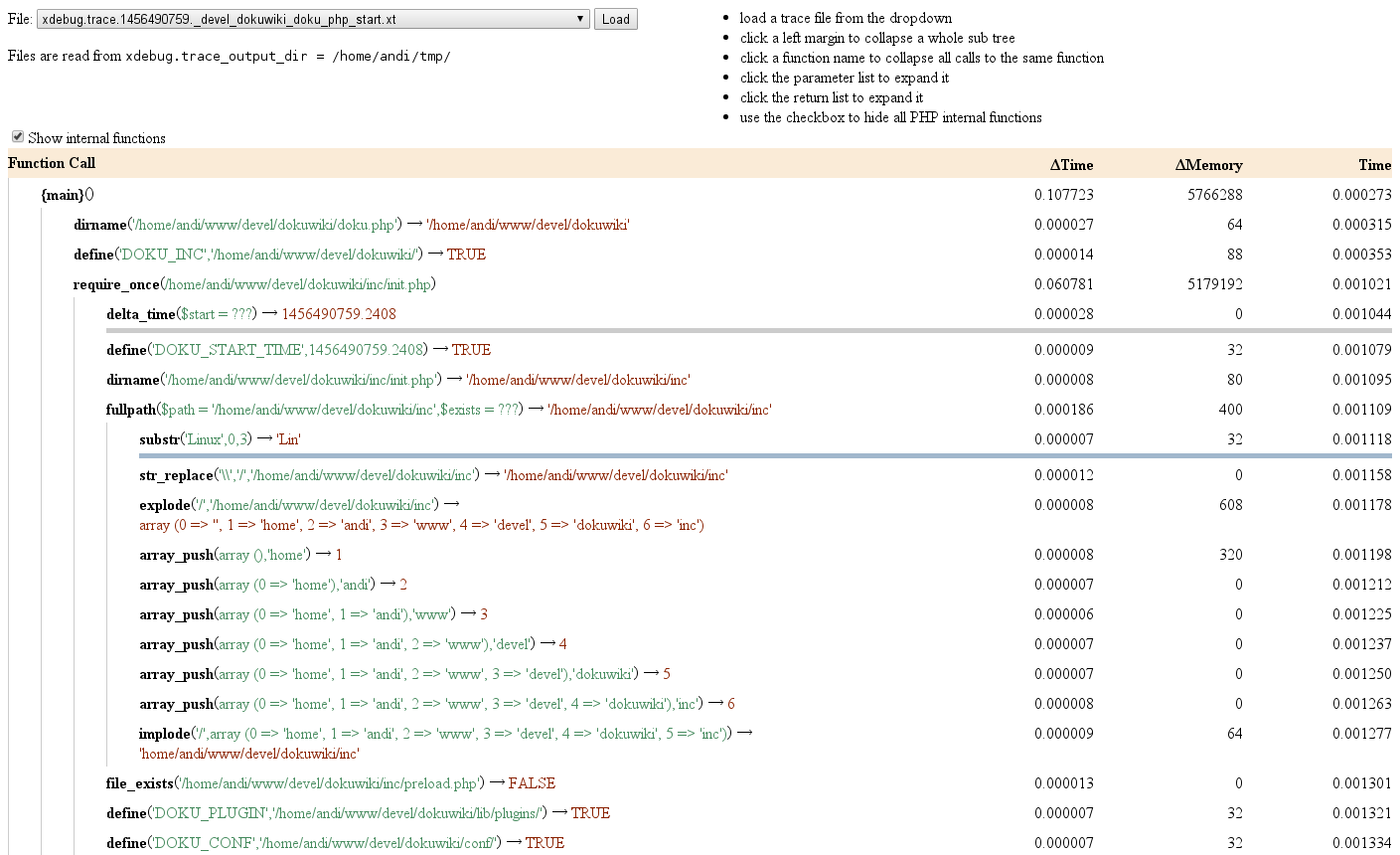
Function traces log every include, function call and method call to a file. If the xdebug.trace_format setting is set to "1" then the trace file is an easy-to-parse tab separated format. The information that is logged includes the time-index when the function started and ended, and it also contains the amount of memory that was in use when entering the function, as well as when leaving it.

He's written up a sample script (you can grab it from the Xdebug CVS server) that you can run on a file and push all ouf the output to the trace file for easy parsing. The script reads in the file and displays the results in a nice format on the command-line (easily adaptable for a web frontend).

0 comments voice your opinion now!
xdebug memory trace usage tutorial


Derick Rethans' Blog:
Variable tracing with Xdebug
March 25, 2009 @ 11:16:52

Derick Rethans has made a quick post about an update he's made to the XDebug function traces to add in information on variable modifications.

After I had a quick look at the feasibility of this feature I spend some time on implementing it for Xdebug's HEAD branch that is going to become Xdebug 2.1. Variable modification tracing can be enabled by setting the php.ini xdebug.collect_assignments setting to 1. Of course this can also be done in either .htaccess or by using ini_set(). This setting requires general execution tracing to be enabled as well and it's only available for human readable trace files (the default format).

He gives examples of how two example scripts would be logged to the trace file - one inside of a basic function and another showing updates to the properties on a class.

0 comments voice your opinion now!
variable trace update change xdebug trace file output


DevShed:
Tracking a Stack of Function Calls with the Xdebug Extension
March 16, 2009 @ 13:14:19

On DevShed today the latest article in their XDebug series has been posted, a look at tracking the function call stack with help from functionality the extension provides.

Despite this inconvenience [pf not being able to get more in-depth], in this final part of the series, I'm going to show you how to work with a function of the library called "xdebug_get_function_stack()." This function can be used to keep track of the stack of function calls generated by a PHP script, in this manner completing this starting guide on this helpful extension.

After reviewing the script from the previous part (using xdebug_time_index) they get into this new function and what sort of output it provides. The stack is the trace of what functions and values were passed around in the script including information like the function name, parameters and the file it was in.

0 comments voice your opinion now!
track stack function trace xdebug extension tutorial


SitePoint PHP Blog:
Introducing php-tracer-weaver
December 09, 2008 @ 08:49:00

On the SitePoint PHP blog today Troels Knak-Nielsen has posted about a lesser known feature of the popular XDebug debugging tool - function traces.

In case you haven't heard of it before, it "allows you to log all function calls, including parameters and return values to a file", to quote the manual. After playing around with it for a while, I realised that this information could be parsed and used to determine parameter types and return types of functions.

To illustrate one use for the trace results, he create a simple script that parsed them and reinjected them back into a source file as docblock comments. Included in the post is an example of its usage and the resulting comments for a simple class. It can be downloaded from github.

0 comments voice your opinion now!
xdebug trace function tutorial github application parse docblock comment


DevShed:
Logging in PHP Applications
December 08, 2008 @ 13:52:10

DevShed has posted a new tutorial today looking at one of the more useful tools a developer can add into an application - logging.

If there is no logging mechanism, then if there's a goof-up in a production environment, you have absolutely no idea what went wrong. The only thing which a support developer can do in this case is to reproduce the issue at the developer end, which sometimes work and sometimes don't.

The look at the types of logging (trace logs, audit logs and user logging/history) and create a simple class that allows flexibility for file location, priority and timstamping. Their script contains a writelog method that does all the work (including pushing it through the PEAR logging class).

0 comments voice your opinion now!
log tutorial pear trace audit history priority timestamp location


Brandon Savage's Blog:
Bug-Free Using Function Traces To Better Understand Code (Part 3 of N)
October 21, 2008 @ 12:05:41

Brandon Savage has posted the third part of his "Bug-Free" series to his blog today. This part focuses on the use of function traces to help narrow down the issue.

Have you ever been handed some code and told, "make it work"? If you haven't, chances are good you will some day. It's often a daunting task, especially since, as one programmer told me, "comments come when the second developer has to make changes." While this is likely bad coding practice, it's happened to me more than once.

Lucky for us, XDebug has a built-in tool that helps us evaluate code and figure out some of what is going on without spending all week reading the documentation or the code itself. It's called "function profiling."

He show how to use this profiling in your code, getting the trace results from a loop that outputs the ord() of a character (in the string "Xdebug"). He also talks about configuration changes you can make to include the parameters of the function call, the memory usage and the returns for each of the functions.

0 comments voice your opinion now!
function trace xdebug phpini profile configure


Andreas Gohr's Blog:
Understanding PHP code better with Xdebug
February 22, 2008 @ 09:14:00

Andreas Gohr has a new blog post today that talks about a way to really get to know your code better - use XDebug to see it from the inside out.

Xdebug is a PHP extension which helps you to understand, debug and profile PHP. It can help you to find bottlenecks or give you an quick overview what happens in code you aren't familiar with, yet.

The post gives a brief overview of the installation of the extension (building a shared module) and shows how to get started with profiling an application. He talks about the cachegrind tool you can use to parse the results and the kcachegrind app that will make the results a bit more visual.

As a bonus, he also throws in a bit about function tracing - picking out each small bit of functionality in the code (the function/methods) and gathering stats for each.

0 comments voice your opinion now!
xdebug profile tutorial install cachegrind kcachegrind profile trace


Community Events


Don't see your event here?
Let us know!


symfony2 development security phpunit interview community conference unittest manifesto api opinion application language custom introduction framework test series podcast release

All content copyright, 2012 PHPDeveloper.org :: info@phpdeveloper.org - Powered by the Solar PHP Framework